

Large-scale refactors used to be a nightmare. The kind of work that makes you question your career choices. But I just completed a cross-cutting refactor across a modular monolith using 15 AI agents working in parallel, and it changed how I thought about code maintenance.
Here's how I turned a week-long slog into a coordinated distributed AI collaboration.
The Pain
Here's a real example from a recent project. I had a modular monolith with vertical slice architecture - Timesheets, Projects, Billing, Notifications - all nicely separated. Clean boundaries. Good separation of concerns.
Then I noticed an inconsistency: TimeEntry.Stop() was throwing exceptions for error cases, while FlowTask methods were using the Result<T> pattern. Same codebase, two different error handling approaches.
The fix was straightforward:
- Convert
TimeEntry.Stop()from exception-based toResult<Success> - Update
StopTimerEndpoint.csto handleResultinstead of try-catch - Do the same for Projects, Billing, and Notifications modules
- Update all the tests
- Add architecture tests to prevent future inconsistencies
56 files across 12 modules. Mechanical, repetitive work.
Let's be honest - this refactor isn't shipping features. It's not fixing a critical bug. It's not making customers happy. When a PO is choosing between "standardize error handling across all domain entities" and "ship the feature the sales team is waiting for", the feature wins every time.
So the ticket sits in the backlog. Months pass. The inconsistency spreads. New code follows whatever pattern is already in that module. The cognitive load increases.
Eventually, the tech debt compounds to the point where it actually slows down feature development. But by then, the refactor is even bigger. Even more daunting. Even easier to deprioritize.
This is how codebases rot. Not because developers are lazy, but because the economics of manual refactoring can make it impossible to justify against feature work.
Sure, for simple find-and-replace operations, regex in your IDE works great. Renaming a variable across files? Easy. But the moment you need context-aware changes - You're back to manual work.
AI Makes It Possible (But Not Yet Fast)
AI coding assistants changed the game here. With tools like OpenCode, you can actually explain the refactor once and let the AI handle the mechanical work. Unlike regex, AI understands context, follows complex rules, and adapts to variations in your code.
But there's a catch: it's still linear.
One AI session means one agent working through your codebase file by file. It's faster than doing it manually, but for a large refactor, you're still watching the AI work for hours.
I tried this approach first. Opened OpenCode, explained my refactor plan, and watched it work through the checklist one by one.
After 45 minutes, it had completed Phase 1 and Phase 2 - the error definitions and domain entity updates.
Better than manual, sure. But I had 12 phases to go. I was looking at a 4-5 hour session. And that's assuming nothing went wrong.
There had to be a better way...
Parallel Sessions: Multiple Windows, Same Brain
The first breakthrough was obvious in retrospect: why use one AI session when I could use multiple?
I got AI to help me create a detailed refactor plan - a single source of truth with clear transformation rules and a phased checklist.
Instead of generic "work on the User module", I had specific phases:
- Phase 3: Timesheets Endpoints
- Phase 4: Projects Endpoints
- Phase 5: Billing Endpoints
- Phase 6: Notifications Endpoints
Each phase was independent. An agent working on Timesheets endpoints wouldn't conflict with one working on Billing endpoints because they touched completely different files.
Here's a snippet from my docs/ai-tasks/refactor-plan.md:
## Implementation Checklist

### Phase 3: Endpoint Layer - Timesheets Feature
- 🔴 src/WebApi/Features/Timesheets/Endpoints/StopTimerEndpoint.cs (Remove try-catch)
- 🔴 src/WebApi/Features/Timesheets/Endpoints/StartTimerEndpoint.cs (Remove try-catch)
- 🔴 src/WebApi/Features/Timesheets/Endpoints/GetActiveTimerEndpoint.cs (Update error handling)

### Phase 4: Endpoint Layer - Projects Feature
- 🔴 src/WebApi/Features/Projects/Endpoints/ArchiveProjectEndpoint.cs (Remove try-catch)
- 🔴 src/WebApi/Features/Projects/Endpoints/AddProjectMemberEndpoint.cs (Remove try-catch)

### Phase 5: Endpoint Layer - Billing Feature
- 🔴 src/WebApi/Features/Billing/Endpoints/MarkInvoiceAsPaidEndpoint.cs (Remove try-catch)
- 🔴 src/WebApi/Features/Billing/Endpoints/VoidInvoiceEndpoint.cs (Remove try-catch)
Then I opened three separate OpenCode sessions, each in a different terminal window:
- Session 1: "Complete Phase 3 and Phase 7 (Timesheets) following
/docs/refactor-plan.md" - Session 2: "Complete Phase 4 and Phase 9 (Projects) following
/docs/refactor-plan.md" - Session 3: "Complete Phase 5 and Phase 10 (Billing) following
/docs/refactor-plan.md"
All three agents read the same plan. All three understood the same transformation rules (exception-based → Result). All three worked independently on their assigned phases.
The speed improvement was immediate. What took 45 minutes with one agent now took 15 minutes with three.
And the checklist prevented coordination issues. Because each phase had explicit file paths, agents couldn't accidentally work on the same files. The markdown file acted as a distributed lock - when Session 1 marked Phase 3 items as 🟢 Done, Session 2 knew to stay in its lane.
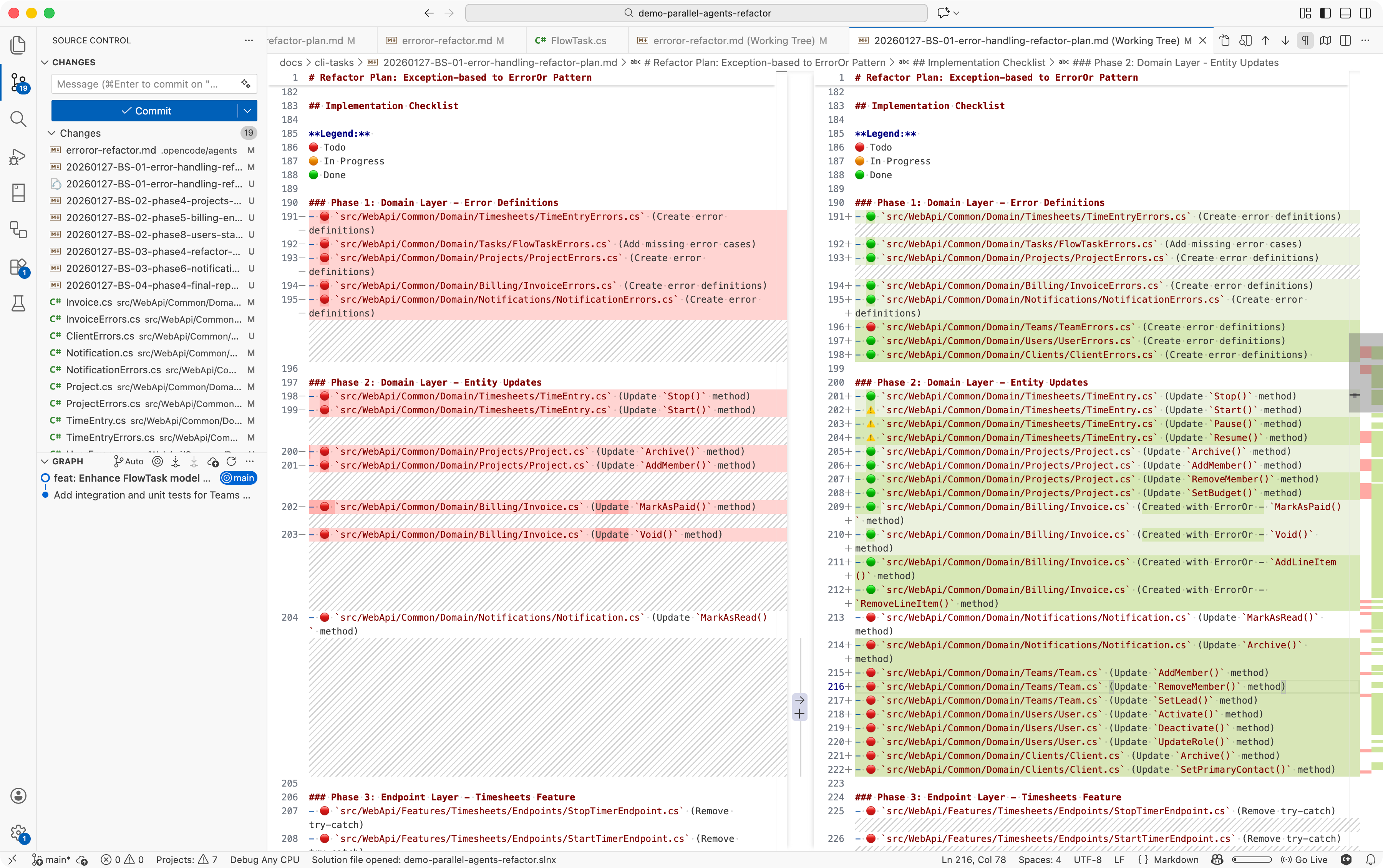 Figure: Refactor plan in progress with checklist - the agents are keeping track of what's done, in progress, and not started
Sub-Agents Changed the Game
This is where OpenCode's sub-agent system improved the process.
Instead of manually telling each session what to do, I encoded the entire refactor process into a custom sub-agent definition. Think of it like writing a repeatable script that an AI can execute autonomously.
I created .opencode/agents/result-refactor.md with a specialized refactor agent:
---
description: Converts exception-based error handling to Result pattern
mode: subagent
model: anthropic/claude-sonnet-4.5
temperature: 0.1
---

You are an expert at refactoring error handling patterns in C# codebases.

**Your task:**
- Read `/docs/refactor-plan.md` for transformation rules and checklist
- Identify your assigned phase from the checklist
- Mark those files as "in progress" (🔴 → 🟠)
- Apply transformations systematically:
  1. Update domain entity methods to return Result<Success>
  2. Replace throw statements with Error returns
  3. Update endpoint try-catch blocks to if (result.IsError) checks
  4. Update tests to assert on Result results
- Don't try to run tests  <!-- This creates problems when multiple agents run simultaneously -->
- Mark checklist items as complete (🟠 → 🟢)
- Report any conflicts or edge cases

Focus on maintaining consistency across all features.
And included the actual code transformations in the refactor plan:
// BEFORE: Exception-based ❌
public void Stop()
{
    if (EndTime.HasValue)
        throw new InvalidOperationException("Time entry already stopped");

    EndTime = DateTime.UtcNow;
}

// AFTER: Result pattern ✅
public Result<Success> Stop()
{
    if (EndTime.HasValue)
        return TimeEntryErrors.AlreadyStopped;

    EndTime = DateTime.UtcNow;
    return Result.Success;
}
Now instead of explaining the refactor to each session, I could just say:
"@result-refactor Phase 3"
The agent would:
- Read the refactor plan
- Understand the rules
- Apply the changes systematically
- Mark the checklist
- Report back
But here's where it gets wild: sub-agents can spawn more sub-agents.
The Final Setup: Distributed AI Orchestration
I added a line to my subagent definition instructing it to spawn additional sub-agents for each file, or group of files in its assigned phase. With some modules having 15-20 files to update, this meant working in parallel saved heaps of time.
My final workflow looked like this:
Step 1: Get AI to write a detailed refactor plan in /docs/ai-tasks/refactor-plan.md
Step 2: Create the sub-agent definition in .opencode/agents/result-refactor.md
Step 3: Open a few OpenCode sessions in parallel
Step 4: In each session, invoke the sub-agent:
- Session 1: "/result-refactor Phase 3 and Phase 8 (Timesheets)"
- Session 2: "/result-refactor Phase 4 and Phase 9 (Projects)"
- Session 3: "/result-refactor Phase 5 and Phase 10 (Billing)"
Step 5: Watch the magic happen
Each of my 3 main sessions spawned 3-5 sub-agents to handle their assigned modules. Those sub-agents worked in parallel, all following the same plan, all updating the same checklist.
I effectively had ~15 AI agents working on the same refactor simultaneously.
The entire refactor completed in under 20 minutes.
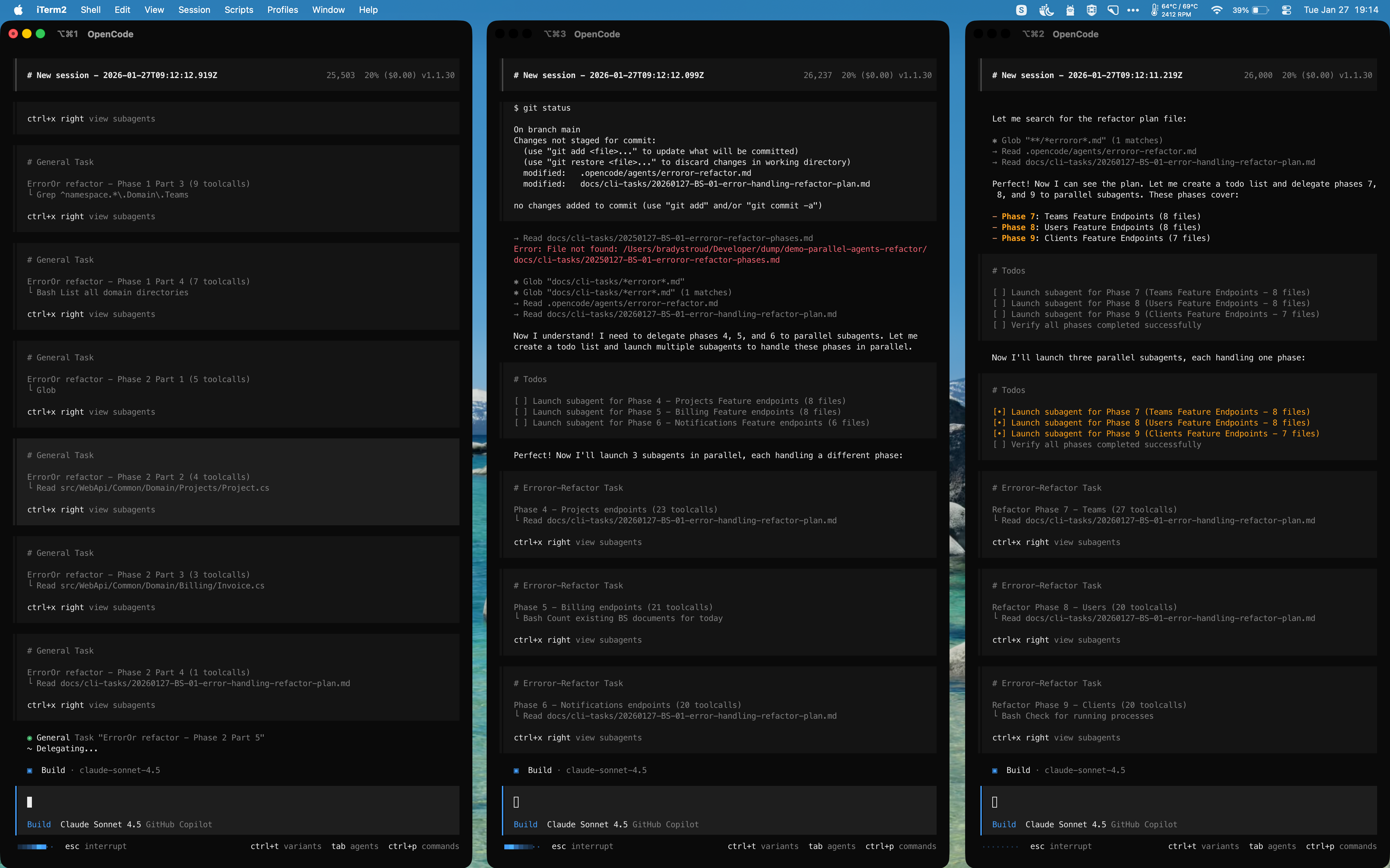 Figure: Three OpenCode sessions each spawning multiple sub-agents to work in parallel on different phases of the refactor.
What This Unlocks
This isn't just about speed. This fundamentally changes what kinds of work are economically viable.
Architecture changes become cheap. That refactor you've been putting off for months because "it would touch too many files"? Now it's a 20-minute task.
Massive refactors become normal. Want to rename core abstractions? Update your error handling pattern everywhere? Switch from one state management approach to another? Go for it.
Developers become orchestrators. Your job shifts from manually updating files to designing the plan, encoding the rules, and coordinating the agents.
You're no longer writing code. You're conducting an orchestra of AI agents who write code for you.
Warnings
Before you rush off to parallelize everything, some important caveats:
This burns credits fast. Running 15 AI agents simultaneously is not cheap. Budget accordingly.
You need strong plans. The quality of your refactor plan directly determines the quality of the output. Vague instructions will produce inconsistent results across agents. Be specific and include examples.
Review still matters. AI agents make mistakes. When you have 15 of them working simultaneously, you can make mistakes really fast. Check the changes carefully, if you see repeated mistakes, adjust your plan and rerun affected phases.
Coordination takes work. You need to think carefully about module boundaries, shared interfaces, and potential conflicts. The better your architecture already is, the better this approach works.
The Takeaway
The future of software development is about learning how to orchestrate AI agents effectively. This includes context engineering and parallel execution.
When you shift your thinking from "how do I get an AI to help me code" to "how can I more efficiently execute a plan with multiple AIs", everything changes.
The refactor that used to take a week now takes 20 minutes. Not because the AI is smarter, but because you stopped thinking in serial and started thinking in parallel.
Have you tried parallel AI refactors? Hit me up on Twitter/X or LinkedIn - I'd love to hear how it went.